A customer shows a photo
A customer shows a picture from last year’s post.
The salesperson finds it by photo in seconds.an illustration of how it worksEach piece with photos, SKU, purity, gross and net weight, HUID, making and stone value, stocked by store. Print tags with barcodes, count stock, see what is ageing, and find a piece by scanning, typing or taking a photo.
 Classic gold bandRG-22-014 · 22K · 4.80 gMain 3 · Branch 1
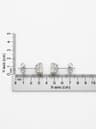 Diamond studsER-18-102 · 18K · 3.10 gMain 2
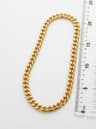 Cuban chainCH-22-051 · 22K · 18.40 gBranch 2
Keeping track of every piece and gram you hold, where it is, what it is worth at today’s rate, and how long it has been there.
From goods received, a CSV, your website or phone photos.
Labels with barcode or QR; RFID if you use it.
Quantities per branch, moved and counted.
Value at today’s rate; slow pieces flagged.
Import columns for gross, net, HUID, making, wastage and stones.
Phone photos become listings.
Snap a piece, find it in stock.
Stones by lot and certificate.
By purity at today’s rate.
Pieces past 90, 180 and 365 days.
Stock checks take a day and still disagree.
A customer shows a picture from last year’s post.
The salesperson finds it by photo in seconds.an illustration of how it worksNothing is typed twice. Each part writes to the same customer and the same stock.
| What you need | Paper and spreadsheets | Generic software | SeeJewel |
|---|---|---|---|
| Built for jewellery (weight, purity, making, HUID) | In the registers | No | Yes, everywhere |
| Joined to your customers and chats | No | Separate tools | One record |
| Works on phone and computer | No | Sometimes | Yes |
| Help in Hindi and English | — | Rarely | Yes, on WhatsApp |
Yes, with keyboard-mode RFID readers that type the tag.
Fifteen minutes on your own shop: your stock at today’s rate, one real day from enquiry to bill, and a straight answer on price.